

Bank statements in. Clean books out.
QBuddy reads any bank statement, even handwritten checks, sorts every line by your rules, proves every total against the bank and posts it into QuickBooks Online or any Windows Desktop version. Your team reviews. Nobody types.
On the night shift for a decade: more than 250,000 bank statements and 12 million transactions read for accounting firms.
From the 9 PM pile to posted books.






You scrolled the story. Now watch the product.
One minute, real screens: a bank statement goes in, and verified entries come out in QuickBooks. No slides, no mockups.
That was the video. The demo is the real thing.
Fifteen minutes, your own statements, your books untouched.
Sample statements, made for the demo.
 1:00
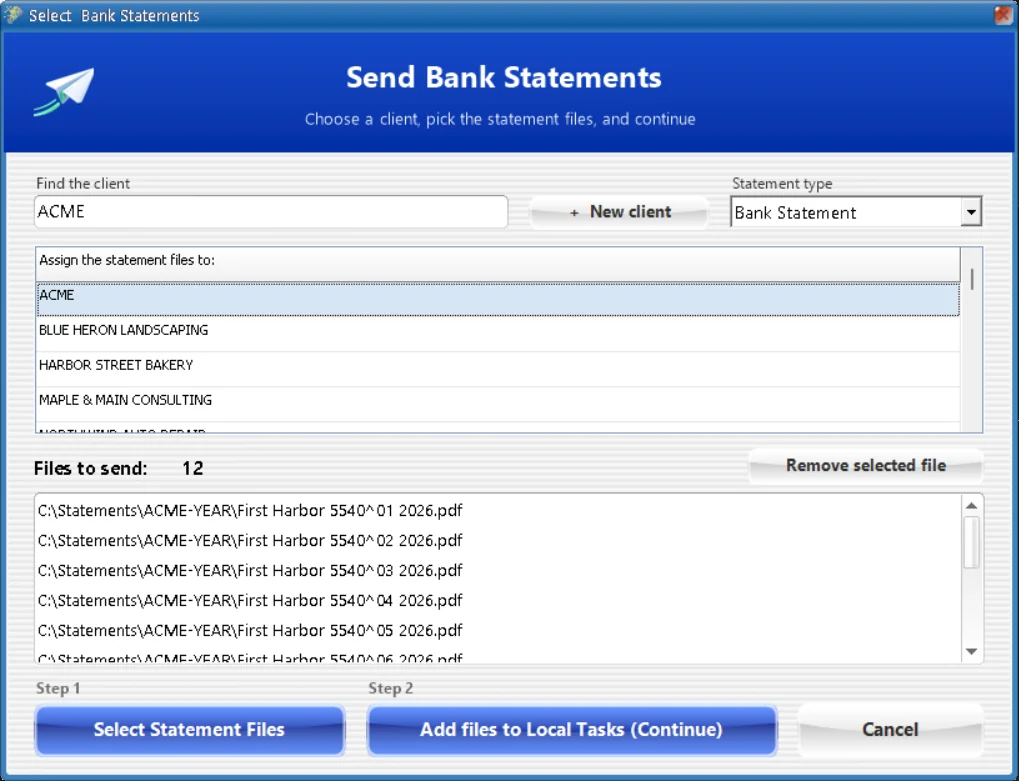
From bank statement to QuickBooks.Follow one statement from PDF to posted, screen by screen. This is all your team does.
1:00
From bank statement to QuickBooks.Follow one statement from PDF to posted, screen by screen. This is all your team does.
 0:43
Every total checked. To the penny.BalanceProof compares what QBuddy read with the bank's own totals before anything posts.
0:43
Every total checked. To the penny.BalanceProof compares what QBuddy read with the bank's own totals before anything posts.
 0:51
Checks, read like a person reads them.Payee and memo come off the check itself, so a check stops being a mystery line.
0:51
Checks, read like a person reads them.Payee and memo come off the check itself, so a check stops being a mystery line.
You have seen the product. Now meet the story behind it.
The night someone finally asked why a whole floor was still typing bank statements. Eight minutes, worth it on a Friday.
That was the film. The demo is the real thing.
Fifteen minutes, your own statements, your books untouched.
This browser cannot play the film. Please try another browser, or book a demo and we will show it to you.

proven
Not just faster.
Actually caught up.
That was QBuddy's night shift. bright i-deas has been building him for a decade: the teammate who quietly takes on the tedious, error-prone data entry so your people can do the work they actually trained for.
The name tells the whole story. QB is for QuickBooks, and he is the Buddy who does the part of the job nobody enjoys.
Not a promise.
A decade of night shifts.
Long before you found this page, QBuddy was already doing the typing for accounting firms. These numbers come from our own records, not from a forecast.
Counted from the records we keep today, April 2017 to October 2026, without demo or test accounts. The true count is higher, and it grows every night.
Rules that write themselves.
You still sign off.
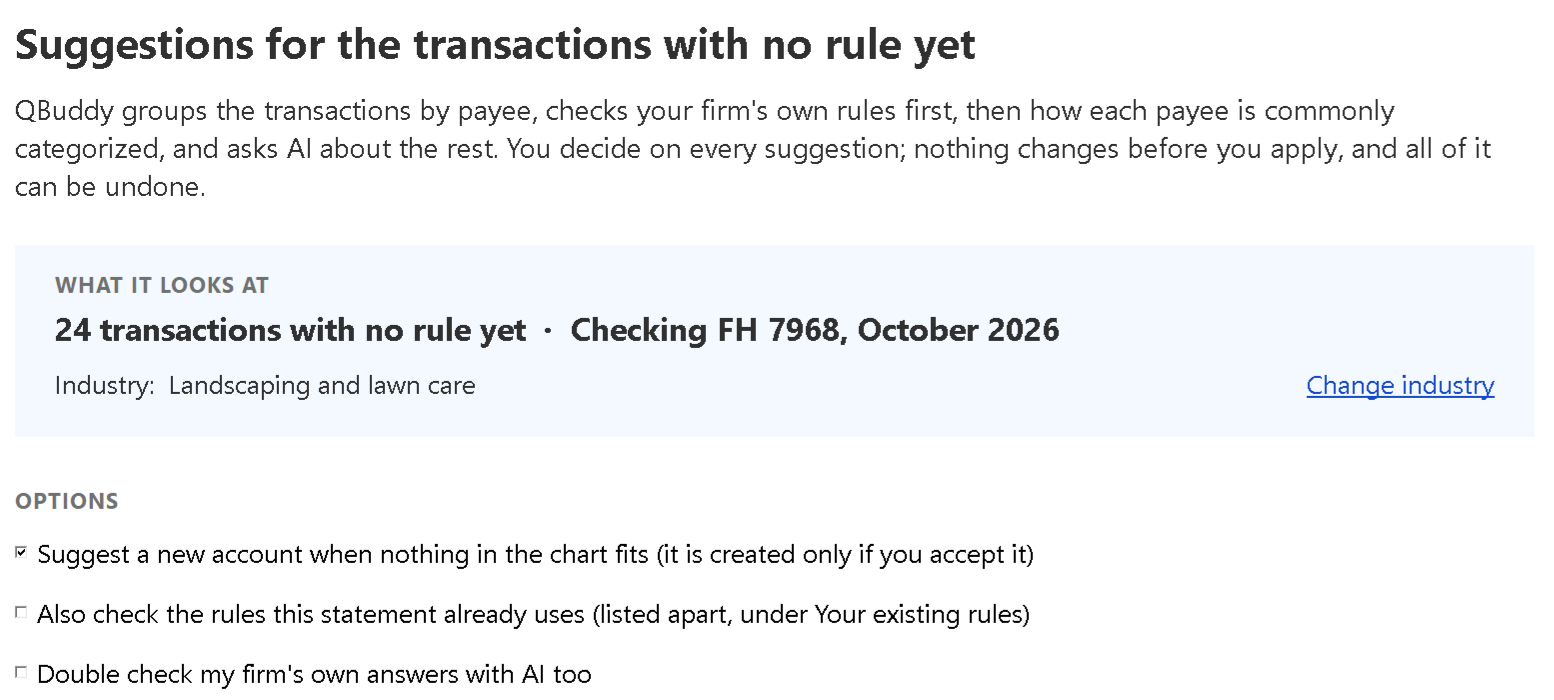
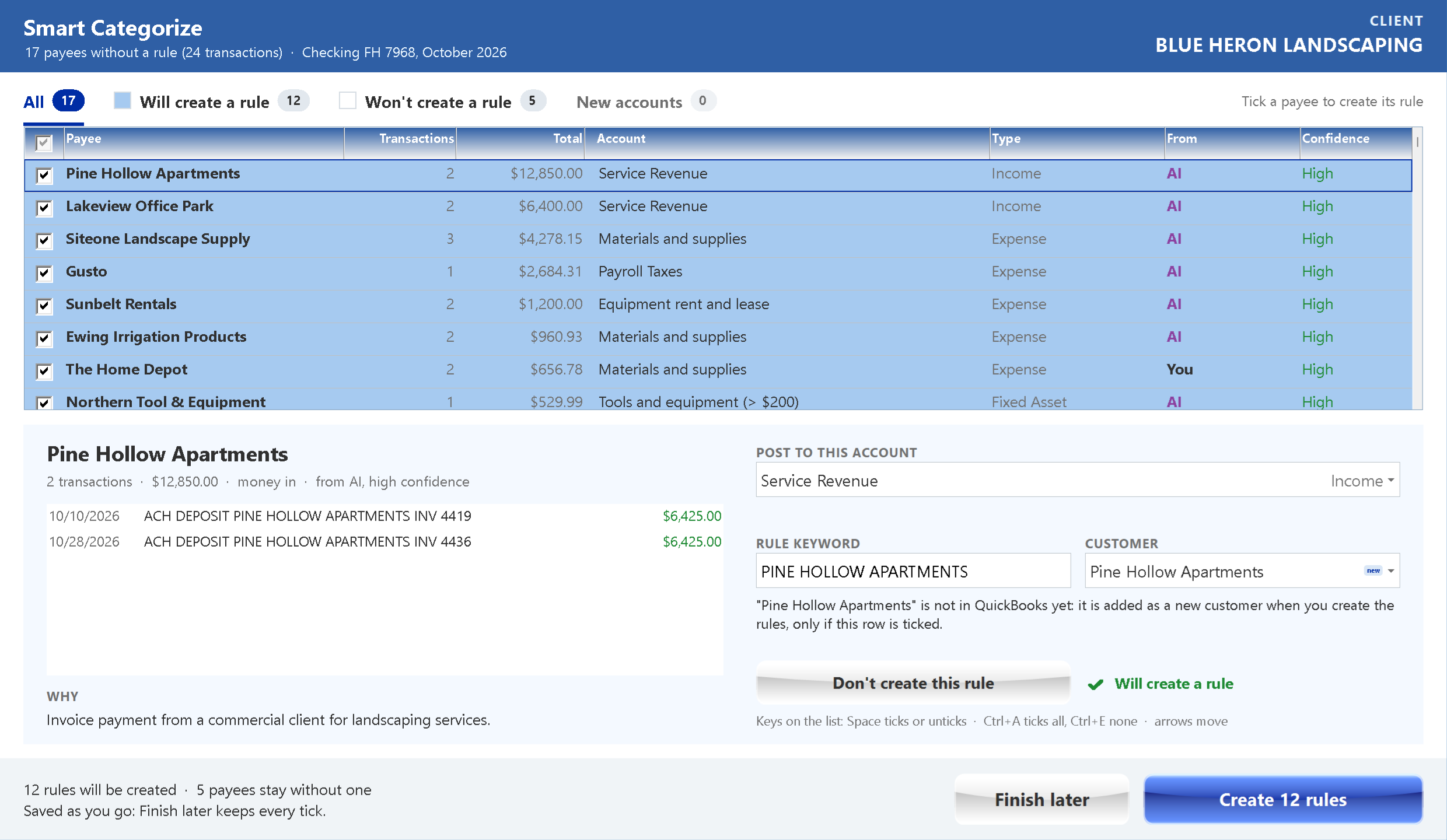
A new client's first statement is all white lines, and someone has to decide where every one of them goes. Smart Categorize does that first month for you. It groups the lines by payee and suggests the account for each one: your firm's own rules first, then common practice, then AI for the rest. You review, tick, and one click turns every accepted suggestion into a rule.
- 1
It starts from what your firm already knows. Your own rules lead, then what other firms agree on, drawn from more than 700,000 rules written in QBuddy. AI only fills the gaps.
- 2
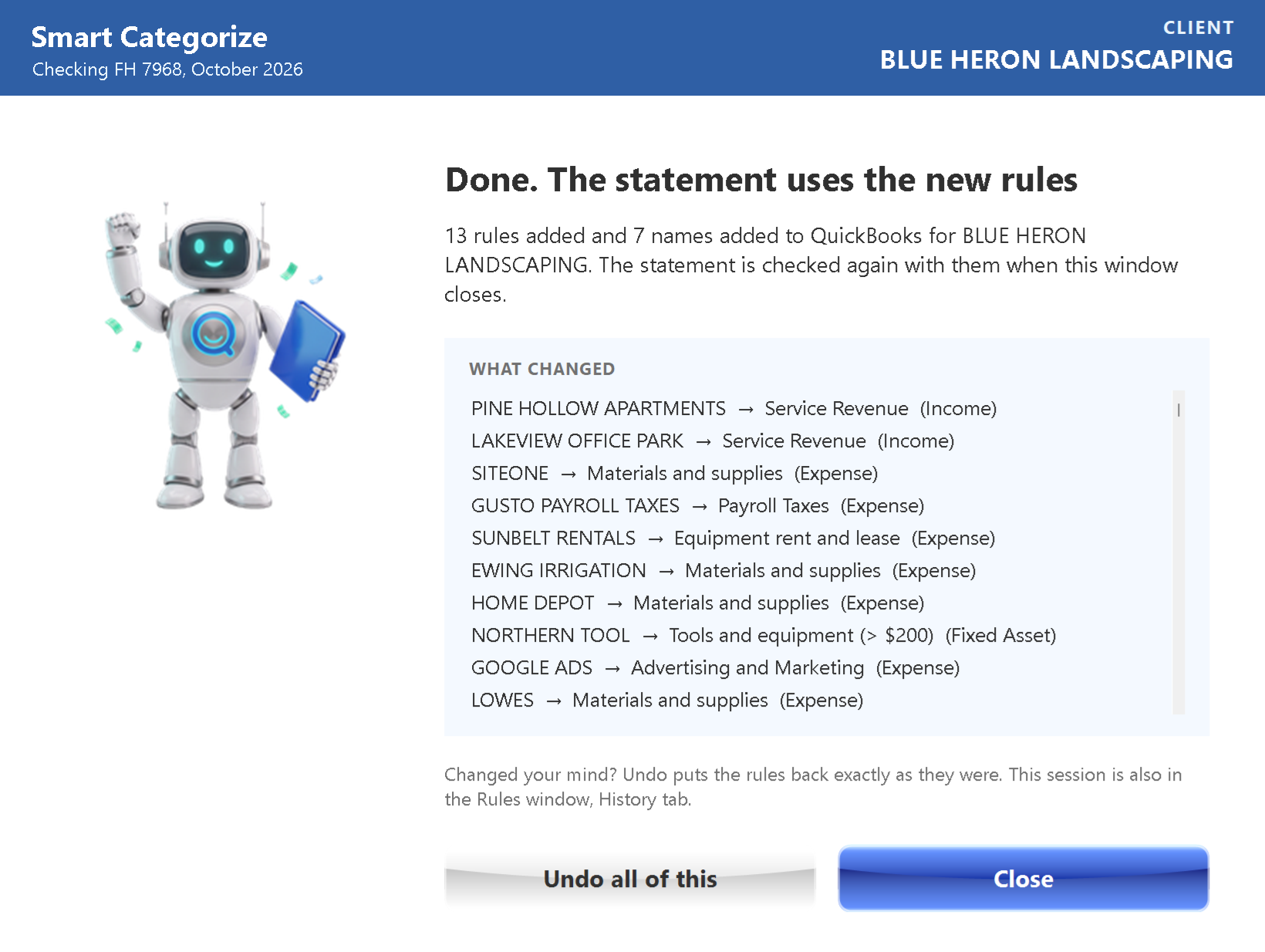
You see why, and you decide. Every suggestion shows where it came from, how sure it is and why. Nothing changes until you apply, and one click undoes the whole session.
- 3
Once, then every month. Each accepted suggestion becomes a rule, so next month those lines arrive blue and post themselves, on QuickBooks Online and every Windows Desktop version.
Also new: Second Opinion, a second look at the rules you already have, and Smart Start, a new client's chart ready on day one.


Every statement you type costs more than you think.
You just watched the whole job run without a keystroke. Here is what the old way costs your firm every week it stays. Every hour a skilled bookkeeper spends keying in statements is payroll spent on work a machine should do.
- Payroll spent on keystrokes, month after month, client after client.
- Rework when errors slip through, found at month-end instead of up front.
- Clients you could not take, because the team was buried in typing.
QBuddy does this work in minutes, verified to the penny, so your payroll buys judgment instead of keystrokes.
What does typing cost your firm?
Move the sliders. Your numbers, your math, every week and every year.
The whole firm on QBuddy costs less each week than one person's day of typing.
That is payroll spent on data entry alone, before the cost of errors, rework, and the clients you could not take.
See it disappear in a demoYour whole team, all week, for less than one person's day.
QBuddy is not a seat you buy for one bookkeeper. He works for everyone at once: every person, every office, every client, on Desktop and Online. One weekly price covers all of it, and it costs your firm less each week than one person costs in a single day of typing.
Book a 15-minute demoAlready have a way to do this? Let's compare notes.
These are real conversations we have with firms every week. Pick the one that sounds like you: the honest answer, and the full comparison with its sources, are one click away.
Feeds are convenient until they are not. They can miss or duplicate transactions, they reach back only as far as each bank allows, and they never prove themselves against the statement. QBuddy works from the statement itself, and BalanceProof compares its credits, debits and ending balance with the bank's own totals: if one disagrees, QBuddy stops before QuickBooks and shows you which.
- The statement is the source of truth, not a feed
- Backlogs and catch-up months are no problem
- Verified before posting, not discovered after
A converter turns the statement into a spreadsheet, and that is the cheapest minute of the job. Classifying every line, finding each account, importing, fixing the rejects and tying out the month are all still yours. QBuddy does the whole job, and for most of the firms we serve it comes to cents a week per client. Nobody runs a firm on consumer tax software. Same reason.
- Classified by your rules, not by hand
- Every total proven against the bank
- Posted to QuickBooks, no import files
No. Intuit stopped selling new Pro, Premier and Mac subscriptions, and in its own words that is not a sunset: current subscribers keep renewing, Enterprise is still sold and updated, and Desktop 2024 has no sunset deadline. QBuddy posts to QuickBooks Desktop and Online, chosen per client, and moving a client is one click with every rule kept.
- Every Windows Desktop version, and Online
- Switch a client in one click, rules kept
- Your firm keeps its choice
Access still means downloading a CSV, reshaping it into the 3 or 4 column layout QuickBooks Online expects, importing it, and fixing whatever mapped wrong. With QBuddy you just download the PDF statement the bank already gives you. No tweaks, and the rules you set for that client apply automatically.
- No CSV reformatting or column mapping, ever
- The PDF carries the opening and ending balances, so everything ties out
- The same PDF is the record you keep for the file
A general chat tool can read a statement. It cannot guarantee one. There is no rules engine for your chart of accounts, no tie-out against the bank's totals, no posting into QuickBooks, and no consistency from one statement to the next. QBuddy is purpose-built for this one job and proves every total before anything posts.
- Your chart of accounts, enforced every time
- Every total verified against the bank
- Posts directly into Online or Desktop
Busy season is exactly when typing costs the most. And starting is easy: see it run on your own statements in a 15-minute demo, with no setup project, no migration and no contract. The firms that started with QBuddy a decade ago are still with it, and none went back.
- See it on your own statements first
- No setup project or migration
- No contract
Still have a question? Bring it to a 15-minute demo.
If the totals disagree, QBuddy stops before QuickBooks.
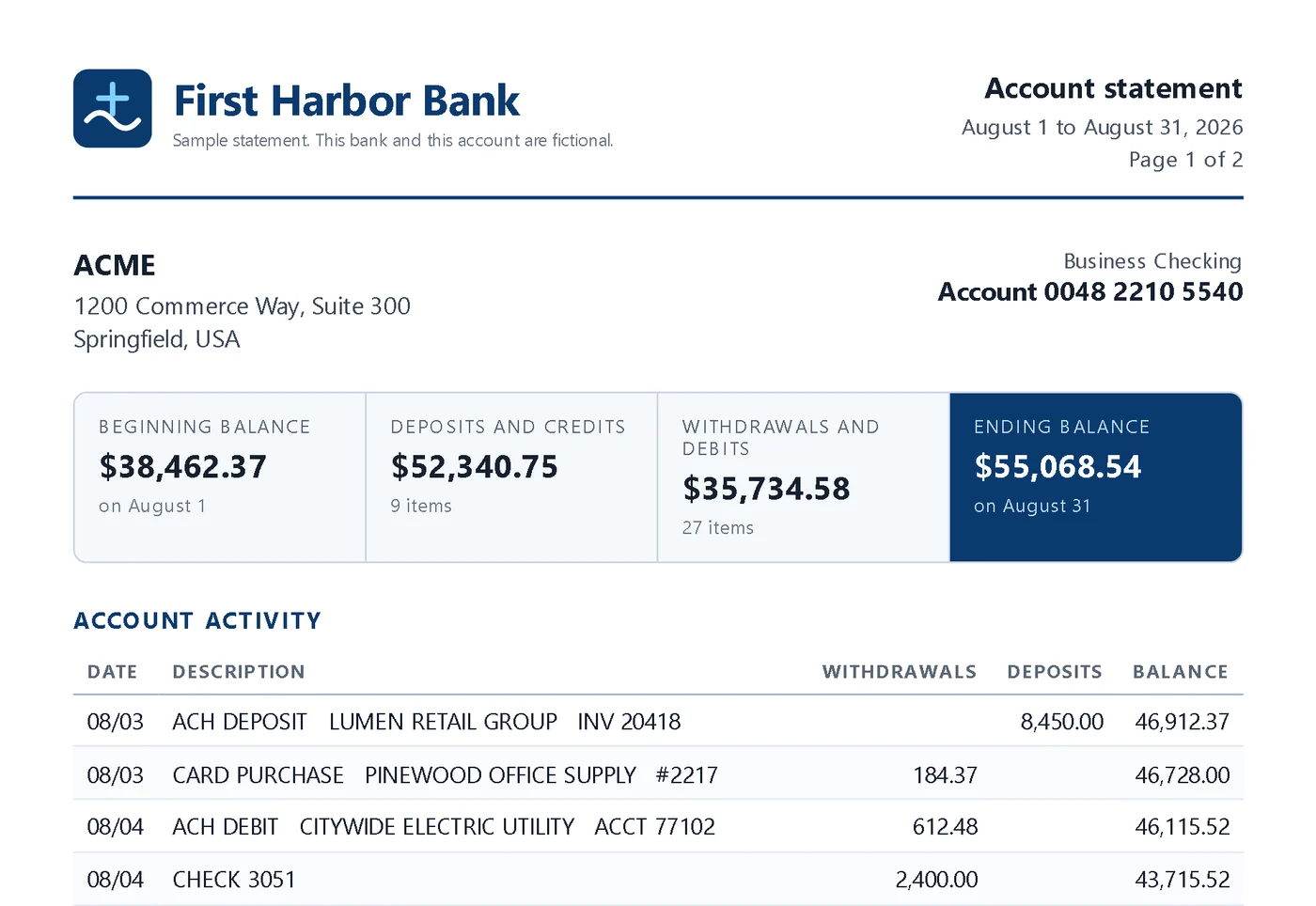
Most tools import first and let you find the problems at month-end. Before anything posts, QBuddy adds up what he read and compares it with the totals the bank printed on the statement. If one disagrees, he stops before QuickBooks, shows you which total and by how much, and waits for your review. Nothing slips through by accident, so the midnight error hunt never starts.
- Credits and debits checked to the penny
- Ending balance checked against the bank
- Stops before QuickBooks if a total is off
Statement vs. QBuddy · sample tie-out
One of these lines was typed wrong. Can you find it?
The bank printed debits of $6,241.39. The lines typed into QuickBooks add up to $6,277.39.
Engineered for the messy real world.
Real firms do not get clean exports. They get scans, shoeboxes, and handwriting. QBuddy was built for that.
Reads handwriting
Handwritten checks on the bank statement are read like print: payee, check number, amount, and memo.
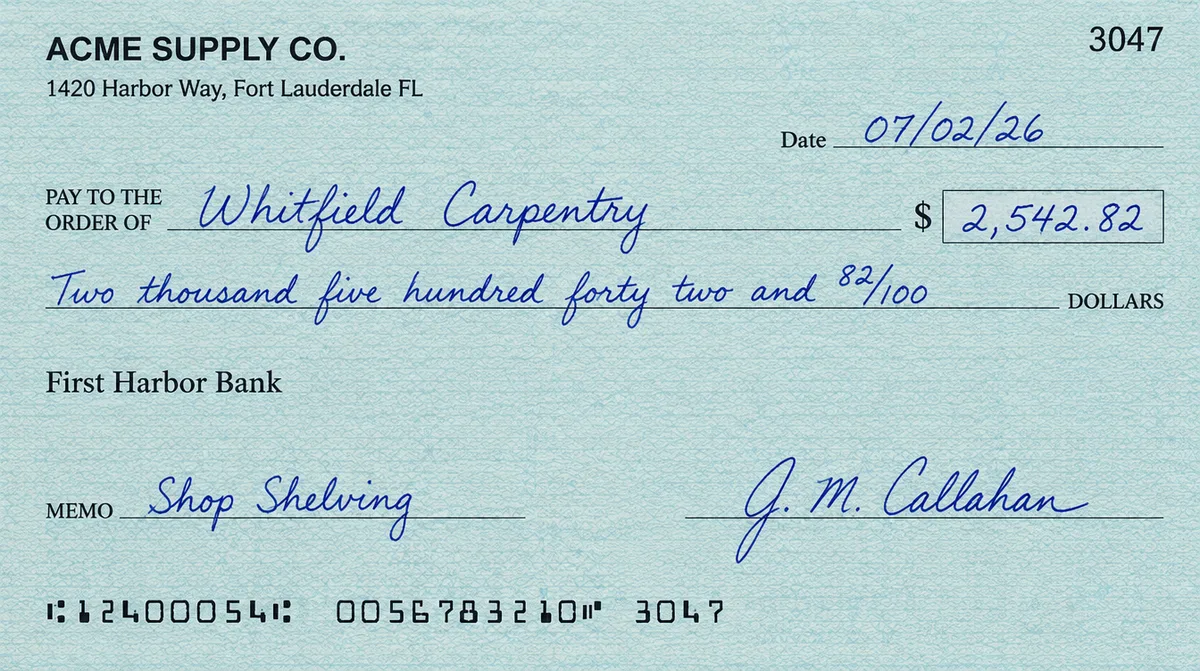 Read by QBuddyThe scan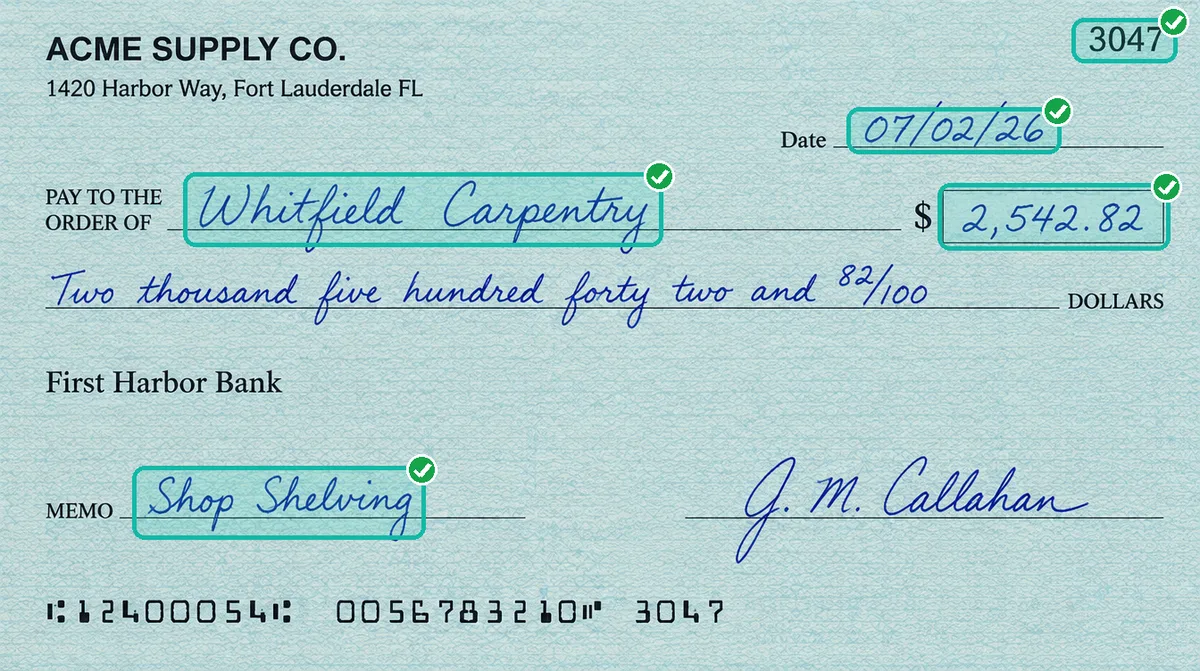
Any bank, any layout
No templates, no mapping. New bank, same result.

A rules engine, not guesses
Your categorization logic, applied every time.
Online and every Windows Desktop
One click to either platform. No migration, ever.
Never sends a line twice
QBuddy remembers every transaction it has already sent. If a posting stops halfway, it picks up where it left off instead of sending the same lines again.
Remembers each client's accounts
Match a statement to its QuickBooks account once. Next month QBuddy already knows it, even when the bank spells it differently.
A year of statements in one send
Catching up a new client? Send all twelve months at once and let QBuddy work through them while your team does something else.
Counts every hour it saves
The owner dashboard turns every transaction your team did not type into hours and dollars, with your own rates.
Handled the way you would want your own handled.
Partners ask about it first, and they should. Here are the straight answers.
Deleted after reading
The statement files are removed from our servers once QBuddy has read them.
Kept in the United States
Our servers are in the United States, and so is the team behind QBuddy.
Nothing posts on its own
QBuddy posts only what your team reviews and sends, into the client company you chose.
Your books stay where they are
QuickBooks stays on your computers or in your QuickBooks Online account. No migration, and no copy of your company file.

Your team learns their new teammate one short lesson at a time.
QBuddy takes the typing. Your people keep the judgment, and QBuddy Academy shows them how: short lessons on the real screens, one job each, in English, Portuguese and Spanish. By the end of level 3 they have sent their first statement.
- 60 lessons for the people who review and post, and 26 more for the people who run the firm
- Points, badges and a certificate with a number anyone can verify
- A printable guide for every role
How QBuddy works, and how we deliver.
Bring your hardest question, or your hardest statement, to a 15-minute demo. Or call us: a real person answers.
Book a 15-minute demo (888) 463-5585Both QuickBooks Online and every QuickBooks Desktop version for Windows: Pro, Premier, Accountant and Enterprise. Run one client on Desktop and another on Online, and switch a client between them with one click whenever you want. There is no migration.
Yes. QBuddy reads any bank statement and any PDF layout, including scanned pages, and when handwritten checks appear on the statement he reads them like print, pulling every transaction.
BalanceProof checks each PDF statement before anything posts: QBuddy compares the credits, the debits and the ending balance he read with the totals the bank printed. If one disagrees, he stops before QuickBooks and shows you which total is off and by how much. Your team reviews it, or chooses on purpose to send it anyway. CSV files carry no bank totals, so for those your team compares the totals with the bank.
Yes. QBuddy classifies each transaction using your chart of accounts and your own rules, so your books stay consistent with how your firm already works. He adapts to you, not the other way around.
Your books and your clients' statements stay yours. The statement files are removed from our servers once QBuddy has read them, and our servers are in the United States. QBuddy posts only what your team reviews and sends, into the QuickBooks file or company you chose for that client. The demo runs in our own demo company, so nothing touches your QuickBooks until you decide.
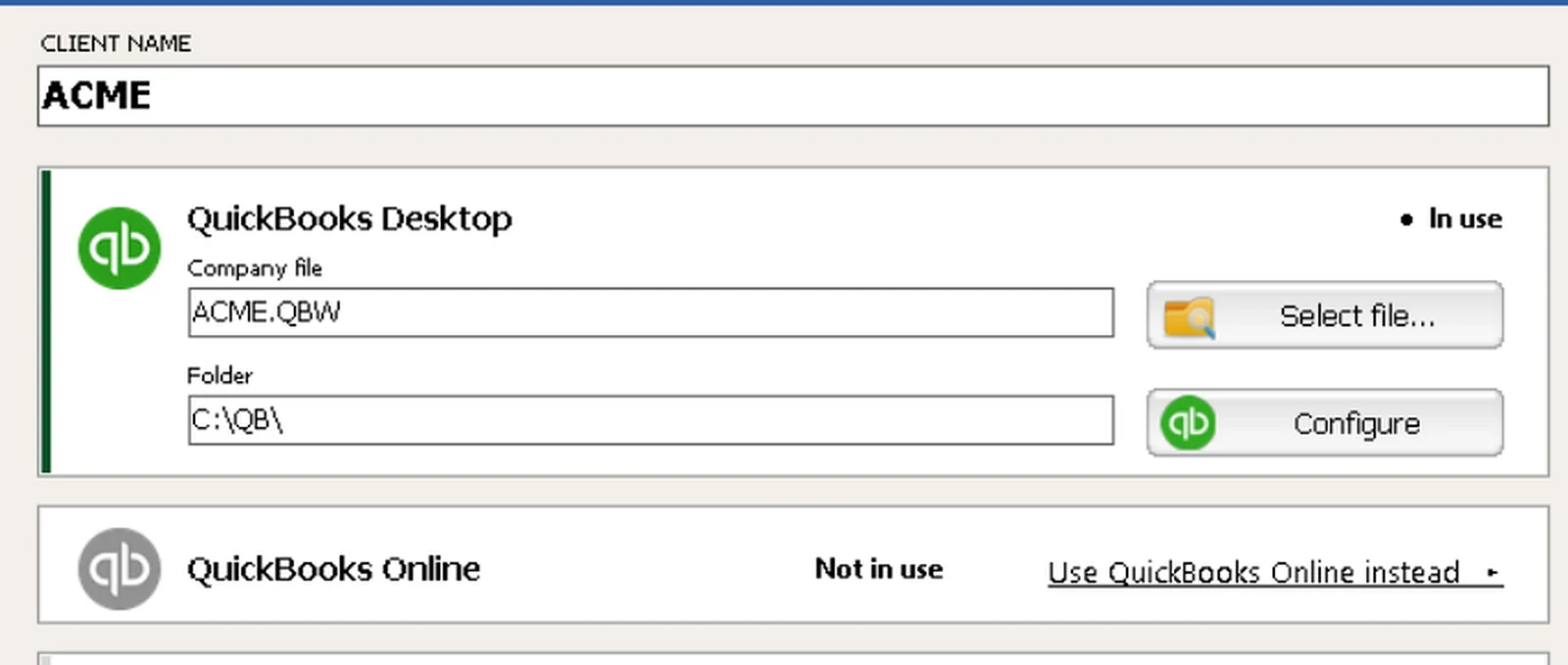
Start with the demo. When you decide, QBuddy is installed on your team's Windows computers and connected to each client's QuickBooks Desktop company file or QuickBooks Online company, and it reads that client's chart of accounts for you. Your team learns it at QBuddy Academy, in short lessons. No setup project and no migration.
No. Intuit stopped selling new Pro, Premier and Mac subscriptions, but current subscribers keep renewing, and Enterprise is still sold and updated. QBuddy works with QuickBooks Desktop and Online, chosen per client. Here is what Intuit announced, with sources.
A converter stops at the spreadsheet, and a feed has no statement totals to check itself against. QBuddy reads the statement itself, classifies every line by your rules, proves every total against the bank and posts to QuickBooks. See the honest comparisons.
At QBuddy Academy: short lessons on the real screens, one job each, with points, badges and a certificate. The first statement is sent by the end of level 3, and the whole Specialist track is 60 lessons, about nine and a half hours, taken at your own pace.
Bring us your hardest statement.
We'll run it live.
A 300-transaction quarter, handwritten checks and all. A scanned community-bank PDF. The first month of a year of catch-up. Bring the worst file on your desk to a 15-minute demo and watch QBuddy read it, check it against the bank, and post it into QuickBooks live, in our demo company. Your books stay untouched.
More than 250,000 statements read. Bring the one you think will stump us.
No prep needed. Just the file. No contract, no commitment.
See QBuddy run your own statements.
Fifteen minutes. Bring one client's statements and watch the whole flow, read, verify, post, live in our demo company. Your books stay untouched. No contract, no commitment.
- Pick a time that works for you.
- Bring one client's statements, even the messy ones.
- Watch them run end to end in our demo company.
The firms that started with QBuddy a decade ago are still with it. None went back.
Pick a time that works for you
Choose a slot below. You get a calendar invite with the meeting link right away.
Prefer email? Reach us at info@brighti-deas.com and we will set up a time.
Still deciding? Good. Here is everything we would want to know.
Honest comparisons with their sources, practical guides and short videos on the real screens. Read without signing up, and no sales call. Then bring your questions to the demo.
 4 comparisons
Every option, compared honestlyConverters, bank feeds, spreadsheets, typing by hand: what each one really costs, and when it is enough.Compare
4 comparisons
Every option, compared honestlyConverters, bank feeds, spreadsheets, typing by hand: what each one really costs, and when it is enough.Compare
 Guides
 you can use on MondayRetire typing without disrupting a client, handle handwritten checks at volume, and what Intuit really said about Desktop.Read the guides
Guides
Guides you can use on MondayRetire typing without disrupting a client, handle handwritten checks at volume, and what Intuit really said about Desktop.Read the guides
 15 videos
Every feature, in about a minuteThe real screens, start to finish: send, read, verify, post, the dashboard and the ROI report.Watch
15 videos
Every feature, in about a minuteThe real screens, start to finish: send, read, verify, post, the dashboard and the ROI report.Watch
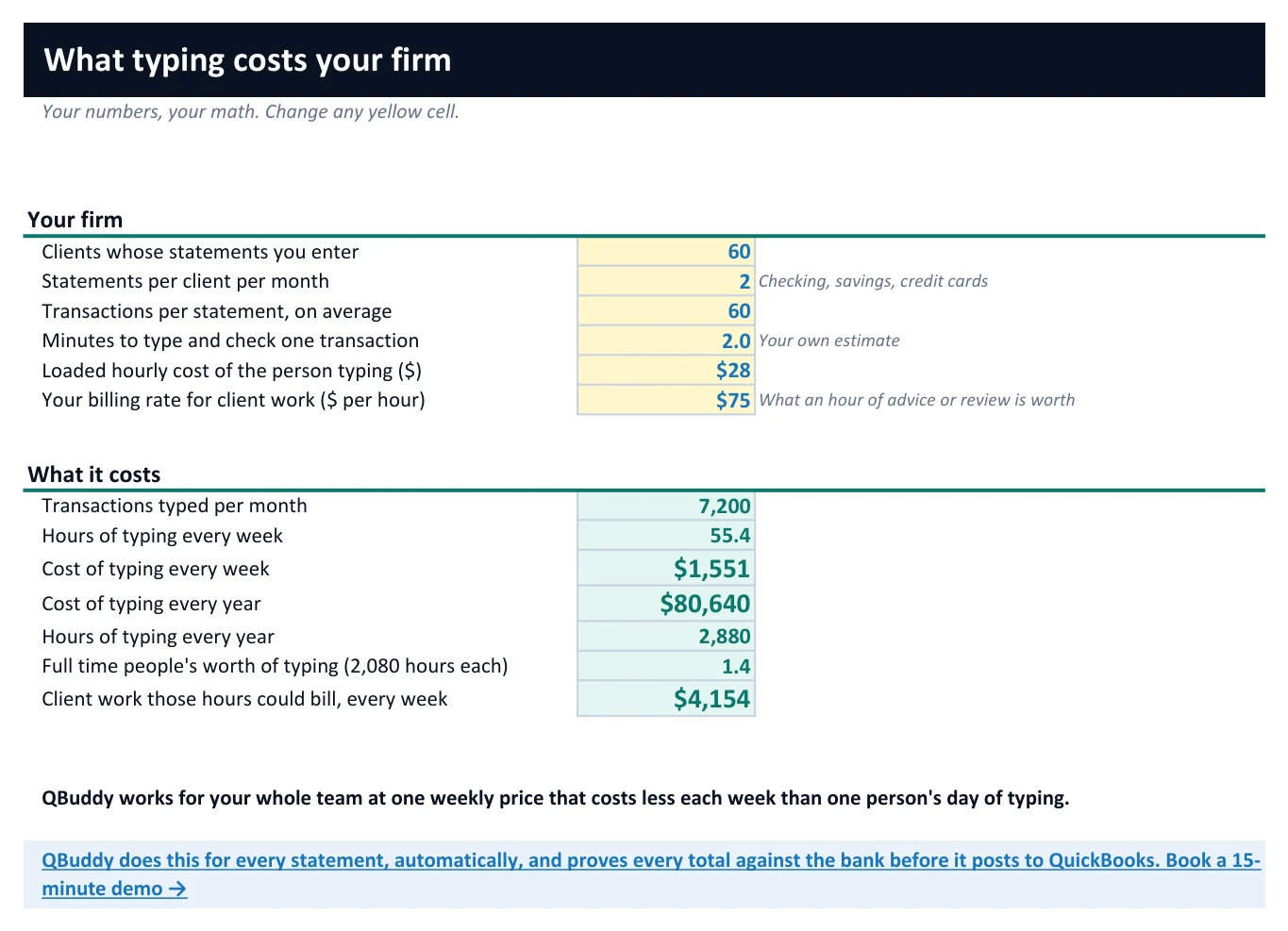
The Firm Profit Toolkit.
See what typing really costs your firm, share a report with your partners, and take home a working Excel workbook. Free, with or without QBuddy.
Get the free toolkit- A live calculator of what typing costs you
- A report to share with your partners
- A catch-up job quote with your margin
- A tie-out that flags transposed digits
- Client messages and a month tracker