The spreadsheet feels like automation. It is manual work, rearranged.
Nobody is typing amounts, so it feels automated. Look at the steps: export or key into a sheet, clean it, map columns, import, then fix whatever the import mangled. Every handoff is a chance for a silent error.
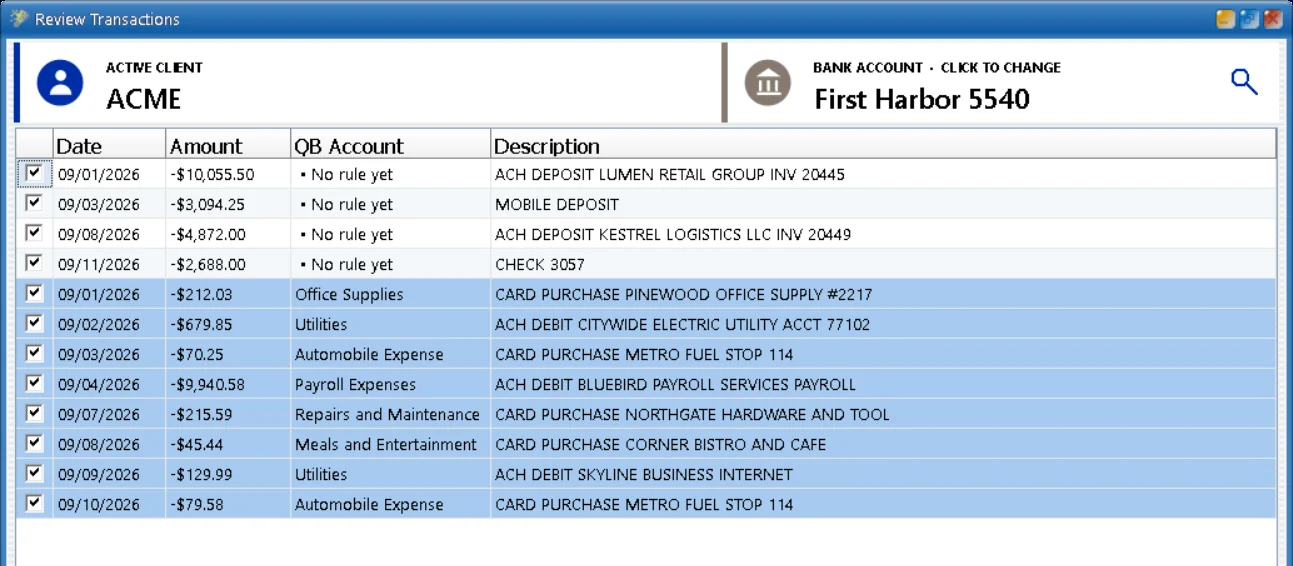

The middle-step workflow.
Get the data out
Download a CSV if the bank offers one, or key the lines into a sheet when it does not. Scans and handwritten checks always mean keying.
Clean it
Date formats, debit and credit signs, split columns, stray header rows.
Categorize each row
Usually with a mix of formulas, lookup tabs and hand edits, per client.
Map the columns
To the import format QuickBooks expects, which differs between Online and Desktop.
Import, fix, import again
Read the error report, fix the rejects, run it again.
Tie out the month
Check the month against the statement, because none of the steps above proved anything.
Each step is small. Together they are an afternoon, and every handoff between steps is a chance for a silent error: a sign flipped, a row dropped, a date read the wrong way around.
Spreadsheet imports and QBuddy.
| Spreadsheet + CSV import | QBuddy | |
|---|---|---|
| Steps to the books | Five or six, each with its own failure mode | One: hand QBuddy the statement |
| Scans and checks | Keyed by hand into the sheet first | Read directly, with everything else |
| Categorization | Formula tabs and hand edits per client | Your chart of accounts and rules, applied consistently |
| Errors | Sign flips, dropped rows, date formats, mapping | BalanceProof ties totals to the bank before posting |
| Import formats | Different for Online and Desktop | Posts to QuickBooks Online and every Desktop version |
Where the spreadsheet still earns its place.
Spreadsheets are unbeatable for analysis: slicing a year of transactions, building a schedule, answering a one-off question. Keep them for that. This comparison is only about the data entry leg, getting clean, verified transactions into QuickBooks, where the sheet is a detour rather than a destination.
See it on your own statements.
Book a 15-minute demo and bring the messiest statement you have. We will run it live.